Our own design

Parix 52. The split ergonomic keyboard.

Wireless, with a trackpad built in. Fifty-two keys, tented, lit, designed and built in Bengaluru.

₹21,999 Everything included, free shipping across India. Pre-order: 20 boards only, shipping from 1 December 2026.

The first unit, filmed in the workshop.
Skip to product information
1 of 4
Regular price Rs. 21,999.00
Regular price Sale price Rs. 21,999.00
Sale Sold out
Shipping calculated at checkout.

Pre-order, 20 boards only: pay now, shipping starts 1 December 2026 from Bengaluru. Full refund any time before dispatch; 12-month warranty after it.

Switch
Keycaps
Case

From Saurav, founder — I've hand-built more than 200 split keyboards in Bengaluru since Parix started. The 52 is the board I designed to be the one I use every day. Every unit is assembled and tested here before it ships, and if anything goes wrong in the first 12 months, we fix it.

View full details
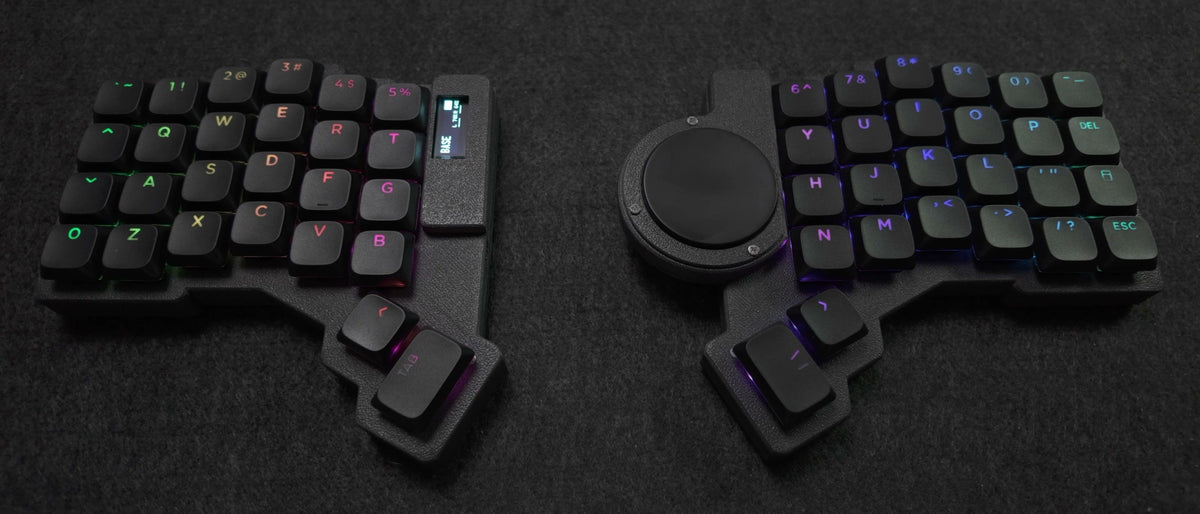
Parix 52 left half, top-down: six columns, four rows and two thumb keys, black shine-through keycaps, small OLED Left half, first unit
01 / layout

Fifty-two keys. Nothing out of reach.

A laptop keyboard is one flat slab with the rows shifted sideways, a shape left over from typewriters. The Parix 52 is two halves, each with six columns, four rows and two thumb keys, staggered to the length of your own fingers. Numbers, symbols and arrows all sit under your hands. Your pinkies stretch less and your wrists stay straight.

Kailh Choc v2 Red linear switches underneath, with a clear top so the lights come through: 43 gf, short travel, smooth and quiet. Hot-swap, so any Choc v2 switch can go in later.

See the default layout →
Parix 52 right half, top-down: 40 mm Cirque trackpad on the inner edge beside the keys, black shine-through keycaps Right half, first unit
02 / trackpad

Point, scroll, click. Without leaving home row.

A 40 mm Cirque trackpad on the inner edge of the right half, a thumb's reach from the keys. Move the pointer, scroll, click, then carry on typing. Your hand stays on the board.

No mouse in the bag. No reach to the right every time you need a cursor.

Parix 52, both halves apart on a desk pad, low angle, no cable between them, black keycaps lit First unit, no cable between the halves
03 / wireless and tenting

Each half goes where your hand is.

No cable between the halves, none needed to the computer. Bluetooth to your machines, switch between them from the board, USB-C to charge. Set the halves a shoulder's width apart and your shoulders open up; your wrists stop bending inward the way they do on a single slab.

The 10° tenting bar holds on with magnets: on for the desk, off for the bag. An RGB LED under every key, a small OLED on the left half for layer and charge, and a 1200 mAh cell in each half, so it runs for weeks with the lights off.

cat specs.txt

At a glance

Keys
52, column-staggered, two thumb keys per half
Switches
Kailh Choc v2 Red linear, 43 gf, hot-swap
Keycaps
Shine-through, black
Trackpad
40 mm Cirque, right half
Wireless
Bluetooth, multi-device; USB-C
Battery
1200 mAh per half
Lights and display
Per-key RGB; OLED, left half
Tenting and case
10° magnetic bar; black PLA
Size
140 × 135 mm per half
Firmware
RMK; remap live in Vial
ls ./box

What's in the box

  • Parix 52, both halves, assembled and tested, Kailh Choc v2 Red linear switches and black shine-through keycaps fitted
  • 10° magnetic tenting bars, one per half, printed in black to match the case

man parix-52

Questions

When does it ship, and can I cancel?

This pre-order is for 20 boards. Shipping starts 1 December 2026 from Bengaluru, in order of pre-order; we email you a date when your board is on the bench. Cancel any time before dispatch for a full refund: email us or DM @parix_in with your order number.

I've never used a split keyboard. Will I manage?

Yes, with a little patience. The stagger and thumb keys feel odd for a few days, then obvious; most people are back to their usual speed within two weeks. You get a starter layout and a short guide, and you can ask us anything.

How do I change the layout, and what are the lights and screen for?

The board runs RMK, open-source firmware, configured in Vial: plug in over USB-C, click a key, choose what it does, and it changes on the board as you watch. Nothing to flash. Layers put numbers, symbols and arrows under your fingers; you start from our layout and we help with the first changes. Keymap and firmware guide; the firmware and the default layout (seven layers with home-row mods, number row on top) are public at github.com/dieselsaurav/parix52.

The RGB under each key shines through the legends and can be dimmed or switched off from the board. With every LED on, expect about a day between charges; dimmed or off, weeks. The OLED on the left half shows your active layer and charge.

Can I change the switches later?

Yes. The first batch ships with Kailh Choc v2 Red linear switches, and every socket is hot-swap for any Kailh Choc v2. Pull one out, push another in, no soldering. The caps are MX-stem too, so other MX-stem sets fit.

Does it work with Mac, Windows and Linux?

Yes. To the computer it is a standard Bluetooth keyboard, or a USB keyboard when plugged in. The layout lives on the board, so it is identical on every machine you pair, and you switch between them from the keys.

What does the trackpad do?

A 40 mm Cirque pad on the right half, a thumb's reach from the keys, with a concave overlay so your thumb finds the centre. Move the pointer, scroll and click without lifting your hand. For drawing or gaming, keep a mouse.

What if something goes wrong? What's the warranty?

Twelve months from dispatch, the same warranty as every Parix board, covering defects in the board, controller, display, trackpad, sockets and case under normal use. Message us; we designed and built it in our own workshop in Bengaluru, so we can fix it. The controller, display and every switch are socketed, so most fixes are a part, not a board, and we cover return shipping within India. Changing switches, keycaps or the keymap does not affect the warranty. Full terms.

Is there a cable in the box?

No. Any USB-C cable charges each half and connects the board to Vial for remapping; you almost certainly own one already. Day to day it runs over Bluetooth and needs no cable at all.